Friday, November 30, 2012

celebrating ourselves and others as How To writers

The Butterflies recognized and celebrated each other as "How To" procedural writers!

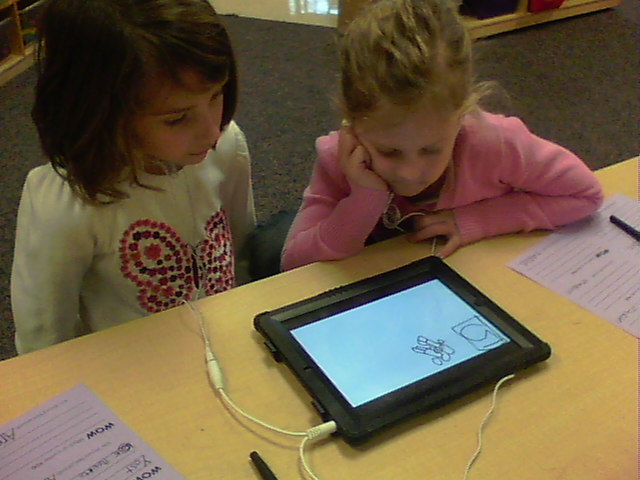
The Butterflies viewed each other's How To "audio" publications, created on the Educreations iPad app, and wrote a compliment to each writer on a "proud sheet"!
Butterflies viewing and listening to How To "audio" publications created through the Educreations app

writers noticing and recognizing skills, strategies, and behaviors used by Butterfly writers


Wednesday, November 28, 2012

publishing a "How To..." audio book- with the Educreations app

Celebrating the First Grade Butterflies as "How To..." procedural writers, the first graders choose one of their How To writing compositions to create an "audio" publication of.

The Butterfly writers used the Educreations iPad app to "draw", "write" and "record" their chosen How To writing piece into an audio (and visual) publication.

The "audio" publication was saved and emailed to my (teacher) email for viewing.  Each writer's "audio" How To publication was shared with the writer's parents through email.

To recognize and celebrate ourselves and others as How To authors, the Butterflies will cooperatively view (with an iPad partner) the How To audio publications of each Butterfly in the class and independently create a "proud sheet" (recording a positive notice that the writer should feel proud of) for each Butterfly after viewing his/her audio publication.  The "proud sheets" will be collected and each first grade writer will receive a set of proud sheets containing a positive note of recognition from each of his/her peers.
a first grade writer publishes
a How To procedural writing piece on the Educreations iPad app

a Butterfly writer creates an "audio" publication
of one of her How To writing compositions

Wednesday, November 21, 2012

learning about a student's mathematical thinking- with Educreations

The First Grade Butterflies learned how to use the Educreations app to record their thinking and problem solving, as mathematicians!

Previously, the Butterflies had been importing a CGI math problem, from a class shared DropBox account, into the Notability app and "showing" (visually) they solved the problem.  After completing, each Butterfly would then export their work into an individual DropBox folder (titled with the student's name and "math journal")... creating a digital math journal.  This allowed me to "see" how their process for solving the problem.
Parents were invited to their child's individual DropBox folder with access to view the contents.

"Seeing" (visually) how each student approaches a (the) CGI problem (or any math problem) of focus is beneficial in learning about a student's mathematical understanding, thinking, and development.

However, even after attempting to have students record their thinking process in writing, accurately identifying and understanding the student's thinking was subjective and limited (due to stages of writing development).

Observing (visually) and listening (auditorily) to a student as she/he solves a problem is ideal in more accurately understanding their mathematical thinking and problem solving.

However...in a classroom of 26 students and 1 teacher, the ability to observe and listen to each student's individual process for solving a problem is not possible.

But, with the Educreations iPad app... it is possible!

Saving a CGI problem (or any mathematical problem) as a "photo" in the class shared DropBox account, students can import the "problem" into the Educreations app.

After importing the problem, students push "record" and verbally explain their thinking process as they visually "show" their thinking.

The app records the process and can then be viewed similar to a "movie"... allowing the teacher to "see" and "hear" the student's mathematical thinking in it's sequential entirety.

The "lesson" is saved and can be "shared" in multiple ways (including e-mail).  Unfortunately, it does not currently have the capability to export the "lesson" into DropBox.

The use of Educreations provides me with the opportunity to "see" and "hear" individual student's mathematical thinking and problem solving when I am unable to individually observe and listen to the student on a day.  YEAH!

mirroring the Educreations app on the SMARTboard
-introducing the students to the features of and use of the app
a Butterfly Mathematician "showing" and "explaining" his thinking
as he solves a JRU CGI problem
a Butterfly Mathematician recording her process for solving a CGI JRU problem
"visually" and "verbally" on the Educreations iPad app
a Butterfly math partner monitoring
his partners thinking process and solution for a JRU CGI math problem

Tuesday, November 20, 2012

using quantities in + and - equations- with the Math Pops iPad app

The First Grade Butterflies continue to develop their understanding of addition and subtraction, recognition of operational symbols, and their understanding of composing quantities and decomposing quantities as mathematicians.

The Butterflies cooperatively use the Math Pops iPad app to apply their understanding.

Utilizing the "addition" and "subtraction" operations through the settings menu, the first graders alternate "identifying" the missing parts of and addition of subtraction equation and "applying" the missing parts to the equation.

 With each problem...
1. The "identifying" partner reads aloud the equation with the two "balloon" quantities needed to complete the equation accurately. (for example- "5+7=12")
2. The "applying" partner moves the identified "balloon" quantities into the equation as she/he reads aloud the completed equation.
first grade math partners complete an addition equation on the Math Pops app
first grade math partners complete a subtraction equation on the Math Pops iPad app
Butterfly Mathematicians cooperatively identify and apply quantities to complete a subtraction equation

Sunday, November 18, 2012

identifying combinations- with the Numblox iPad app

The First Grade Butterflies are developing their understanding of numbers and operations in base ten and their algebraic thinking as mathematicians.

Using the Numblox iPad app, the first graders cooperatively use number rods to identify combinations of a quantity.

After the initial introduction of the Numblox app and number rods, the Butterflies cooperatively explored the Numblox app with their math partner (while in the learning circle) to identify combinations of ten.

As various Butterfly math partners shared combinations and strategies used with the class, a "shared" chart of the combinations identified for ten was created on the SMARTboard and students participated in a discussion of the strategies shared.

Utilizing the Numblox app, the math partners apply strategies to identify combinations of a quantity.

Supporting students' development of recognizing and using the mathematical symbols for addition (+) and equality (=) to create, solve, and/or explain thinking, the Butterfly partners record combinations for a determined quantity in equations (for example- 7+2=9).
Butterfly math partners explore number rods on the Numblox iPad app
math partners cooperatively identify
and record combinations for a quantity of 8
a screen shot of a Butterfly Math Partners' use of the Numblox app
to identify combinations for the quantity of 9

Saturday, November 17, 2012

applying symbols of operations- addition and subtraction

The First Grade Butterfly Mathematicians are developing their understanding of the operations of addition and subtraction, their understanding of the mathematical symbols of operations (+ and -), and their addition and subtraction fact fluency.

Utilizing the Math War app on the student iPads, the First Grade Butterfly Mathematicians cooperatively identify the appropriate symbol of operation (+ or -) to complete an equation.

With each problem, the math partners alternate between "solving and explaining" and "monitoring and completing" the equation.

With each problem...
1. The "monitoring and completing" partner reads the equation.
2. The "solving and explaining" partner determines the operation needed to complete the equation and restates the equation with the determined operation.
3. The "monitoring and explaining" partner monitors the accuracy of the identified operation needed to complete the equation and restates the equation after moving the corresponding operational symbol into the equation.  (If the "monitoring and completing" partner disagrees with the operation identified by the "solving and explaining" partner- he/she prompts the "solving and explaining" partner to explain his/her process and thinking-reasoning.  The partners cooperatively determine the accurate operation needed to complete the equation,) 
math partners determine the operation and operational symbol needed to complete an equation
on the Math War iPad app

identifying the unknown "part" of a "whole"- with the Friends of Ten iPad app

As mathematicians, the First Grade Butterflies have been developing their understanding of the relationship between addition and subtraction through composing and/or decomposing quantities.

Utilizing the "How Many More" and "How Many Less" activities in the Little Monkey Friends of 10 iPad app, the first grade mathematicians work cooperatively with a partner to identify the "whole", identify the "known part", determine the "operation" (of addition or subtraction), and determine the "unknown part" for each problem.

To encourage students understanding and use of mathematical thinking, language, and mathematical symbols of operations (addition and subtraction), a Friends of Ten app recording sheet (I created to correspond to the language of the app) is completed.  With each problem in the app, the math partners alternate between "solving and explaining" and "recording and monitoring".
With each problem-
1. The "solving and explaining" partner identifies the "known whole" in the problem.
2. The "recording and monitoring" partner monitors accuracy and records the "known whole" identified by the "solving and explaining" partner on the Friends of Ten recording sheet.  (If the "recording and monitoring" partner does not agree with the identified "known whole"- he/she explains his/her thinking and the partners cooperatively determine the "known whole" before recording.)

3.  The "solving and explaining" partner identifies the "known part" in the problem and verbally and visually explains his/her thinking-reasoning through manipulating and/or referencing the chips.
4.  The "recording and monitoring" partner monitors accuracy and records the "known part" identified by the "solving and explaining" partner on the Friends of Ten recording sheet.  (If the "recording and monitoring" partner does not agree with the identified "known part"- he/she explains his/her thinking and the partners cooperatively determine the "known part" before recording.)

5.  The "solving and explaining" partner identifies the "operation" (addition or subtraction) and the "unknown part" to solve the problem and verbally and visually explains his/her thinking-reasoning through manipulating chips on the app.
6. The "recording and monitoring" partner monitors accuracy and records the "operation" and the "unknown part" identified by the "solving and explaining" partner on the Friends of Ten recording sheet.  (If the "recording and monitoring" partner does not agree with the identified "operation" and/or "unknown part"- he/she explains his/her thinking and the partners cooperatively determine the "operation" and/or "unknown part" before recording.)


math partners manipulating chips on a tens frame
to identify the unknown part in a whole
math partners identify and record the known "whole" and the known "part"
and determine and record the corresponding operation and the unknown "part"
 using the How Many More and/or How Many Less problems on the Friends of Ten iPad app

Friday, November 16, 2012

operations and number sense- with the Motion Math Hungry Fish iPad app

The First Grade Butterflies are learning, growing, and developing as mathematicians!

As mathematicians, the Butterflies have been developing their understanding of mathematical operations and their number sense. 

Focusing on the First Grade Math Operations and Algebraic Thinking Common Core Standard 1.OA, the Butterflies have been engaging in learning activities to support their understanding and application of operations and the relationship between addition and subtraction.

The Motion Math Hungry Fish iPad app encourages the Butterflies to think mathematically and apply operational understanding to compose a quantity (or decompose a quantity).

Butterfly Math Partners cooperatively engaged with the Motion Math Hungry Fish app to compose quantities in "addition" or decompose quantities in "subtraction".

Encouraging students' number recognition and use of mathematical language, iPad math partners alternate verbally stating the combinations (or decompositions) for a quantity, with the operation (for example- "3 plus 2 plus 5 is equal to 10"), and identifying the numbers referenced by the partner and manipulating the corresponding "bubbles" on the app screen to demonstrate the equation.
Butterfly Math Partners identifying combinations for a quantity
thinking about and identifying combinations
on the Motion Math Hungry Fish iPad app 


Mathematicians "sharing" thinking for
decomposing numbers for a quantity

combinations of 10- using the Tens Frame Fill iPad app

The First Grade Butterflies cooperatively utilize the iPad app, Ten Frame Fill by Classroom Focused Software, to subitize sets within a ten frame, support their understanding of the base ten number system, develop fact fluency to ten, and build their understanding of the relationship between addition and subtraction.

Utilizing the Ten Frame Fill app on the student iPads, the First Grade Mathematicians alternate recognizing the "known" part and identifying the "unknown" part within a whole of ten while verbally explaining his/her mathematical thinking and reasoning to the iPad math partner.

Partners listen attentively to monitor understanding and are developing their use of questions to support their partner in explaining his/her mathematical thinking and reasoning and/or to support their partner in monitoring the effectiveness of the strategy (or strategies) used.
first graders explain their mathematical thinking and reasoning to their iPad math partner

Wednesday, November 7, 2012

Making Words on the iPad

Cunningham's Making Words activities provide an instructional approach and application experience for students to develop an understanding of and recognition of words and word features.

Making Words lessons are guided discovery lessons that provide structures and opportunities for students to develop their phonetic understanding and application of strategies to read and write words.  In a Making Words lesson, students are guided in recognizing, identifying, and applying strategies to read and write words through the manipulation of a set of letters.  Understanding is further encouraged through word sorts and application is promoted through post lesson transfer activities.

The First Grade Butterflies engage in Making Words lessons during Word Study in the classroom.

preparing for a Making Words lesson
For each Making Words lesson, a SMARTboard notebook is created with each word in the lesson on a separate page (as a "word card").
A page containing the relevant "letter cards" is created for the final "mystery-secret word" of the lesson.
For each word sort, a page is created that includes all of the "word cards" from the lesson for student manipulation of the "word cards" on the SMARTboard.

a Making Words lesson
The Butterflies engage in the Making Words lesson on the iPad with their Word Work Partner.

Utilizing the "movable alphabet" on the Word Wizard iPad app, the Butterfly Word Work Partners cooperatively use the letter tiles to create the words in the lesson.  The individual letter sound capability is turned "off" and the word sound capability is turned "on" for Partners to monitor the accuracy of the word attempted and revise or confirm the word attempted.

Interactive Modeling is used to support the Butterfly Word Work Partners in manipulating letters and making words "cooperatively" with a partner for the active engagement, participation, and optimal learning for each Butterfly.

For the final "mystery-secret word" of the lesson, the Butterfly Partners organize the relevant letters across the top line of the app page.  The letters are manipulated to create the "mystery-secret word" in  one of the middle rows.

For the word sorts, the SMARTboard is used inclusively.

Butterfly Word Work Partners cooperatively
manipulating letters on the Word Wizard iPad app
during a "Making Words" activity

Wednesday, October 31, 2012

shapes on a geoboard- with the iPad

The Butterflies' understanding of shape attributes was supported through the use of the Hands On Math Geoboard iPad app.

The Geoboard app was mirrored on the SMARTboard from my (the teacher's) iPad to introduce the app, explain "how" to utilize the app, and as a common visual reference for reinforcing the students' understanding as shapes were created, attributes identified and discussed, and...

The Butterfly Mathematicians created shapes on the Geoboard app cooperatively with a partner on the student iPads.

The Butterfly Mathematicans collaboratively identified and determine defining and non-defining attributes of shapes and collaboratively determined a shape, created a shape, and described a shape relevant to shape attributes.
The Geoboard app mirrored on the SMARTboard
from the teacher iPad
    

Butterfly Mathematicians collaborating
to identify and describe a shape based on attributes

Monday, October 29, 2012

Addition Top-It

Reinforcing the Butterflies' learning of adding two quantities and of comparing quantities, the Butterflies played Addition Top-It with a math partner on the iPad.

The Butterfly Math Partners alternated "dealing the cards" for each play.
During each play, the Butterfly Math Partners alternated finding the sum of their two dealt cards and explaining-justifying their thinking to their partner.
The Butterfly Math Partner with the greatest sum identified their sum as the greater of the two sums and pushed the corresponding arrow on the iPad.
The Math Partner who had the lesser of the two sums "read" aloud the quantity comparison displayed on the app (for example: with the displayed comparison of 12<15, the partner read "twelve is less than fifteen).
Math Partners explaining their thinking when adding two numbers
playing Addition Top-It on the iPad

Butterfly Mathematicians adding two quantities and identifying the greater quantity
using the Addition Top-It app

Friday, October 26, 2012

partner reading on the iPad -with the Storia app

As readers, the Butterflies grow and develop through daily independent reading and partner reading.  

The First Grade Butterflies have learned how to "read with" a partner using "I Read You Read" (alternating pages), "Copycat" (rereading each page), and "Jinx" (reading simultaneously).  The Butterflies have learned how to "talk with" a partner before, during, and after reading by making predictions, making connections, asking questions, checking for understanding, retelling, and reflecting on the reading.

The Butterfly readers have learned the importance of "reading with" a partner, to support decoding and fluency, and "talking with" a partner before, during, and after the reading, to support comprehension.

The Butterflies learned how to access the books available in the Storia iPad app to "read with" and "talk with" a reading partner.

Available books are organized on bookshelves.  Bookshelves are titled using the language of the organization of developmental reading levels in our classroom library (for leveled texts) and/or titled using the language of the organization of books in our classroom library.  The titles of the bookshelves support the Butterflies identification of "just right" books for independent and/or partner reading.

The Butterflies used their understanding of the organization of our classroom library to identify "just right" books for partner reading and to cooperatively choose a book(s) to "read with" and "talk with" their reading partner.

The Butterflies were excited to read books on the iPad and actively engaged with their reading partner in "reading with" and "talking with" one another as readers! 
Butterfly Reading Partners reading a Fly Guy book on the iPad

a Butterfly referencing a part of the text
to explain his thinking to his reading partner

Butterfly Readers partner reading on the iPad

word study on the iPad

The Butterflies have been developing their phonetic understanding and application through word study.

Utilizing the Word Wizard app on the iPad, the First Grade Butterflies cooperatively worked with a Word Work Partner to "use words we know to read and write other words".

The Partners used letter tiles to "make" and read a known word (example- "jump") on the Word Wizard app.  Partners identified the "helpful chunk" (word family) in the know word (example- "ump" in the word "jump") and manipulated the initial part of the word to read and "make" other words (example- read and make "bump", "clump", "lump", "dump", "stump"...).

Utilizing the capability of the app to provide individual and/or combined letter sounds, the Butterfly Partners monitored the word "made" for accuracy and generated a sentence (orally) that demonstrated an understanding of the word's meaning in context.
The Word Wizard iPad app
mirrored on the SMARTboard

Butterfly Partners using the Word Wizard iPad app
Butterfly Partners using the "helpful chunk" (word family) in a known word
and manipulating the initial part to read and write other words-
with the Word Wizard app on the iPad

Wednesday, October 24, 2012

Read Word identification with the Reading Eggs Sight Words app

Butterfly Readers were introduced to the Reading Eggs Sight Words app on the student iPads.

Partners cooperatively and collaboratively engaged in identifying sight words with the Reading Eggs app.

Partners alternated identifying ("touching") the appropriate word and reading the word (prior to "touching").  The Butterflies challenged themselves to increase the speed of the words and the difficulty of the app.  Partners were excited to share their progress!
Butterfly Word Work Partners cooperatively identifying Read Words
using the Reading Eggs Sight Words app on the iPad

Tuesday, October 23, 2012

Butterflies as "shape detectives" on the iPad

Supporting their identification of shapes and understanding of attributes... the First Grade Butterflies cooperatively searched for shapes in the classroom environment as "shape detectives".

With a math partner, the Butterflies imported the "shape detective" recording sheet (from the Butterfly shared "iPad MATH" folder in the class Dropbox account) into the Notability iPad app.

The Butterfly "shape detectives" utilized the capability to "take a photo" within the Notability app to photograph shapes recognized within the classroom environment.  The partners then inserted the photograph into the relevant location on the recording sheet and resized the photograph to fit in the specific area provided on the recording sheet.

The "shape detectives" accessed the pen function (and chose a color that would be visable on the photograph) and traced the corresponding shape in the photograph.

After completion, each "shape detective" exported the completed recording sheet to his/her individual math journal folder within the class Dropbox account and emailed me (the teacher) the completed recording sheet.  ("Shape detectives" wrote their names on the recording sheet prior to beginning their "search".)

"Shape detective" recording sheets were accessed through my (teacher) email and displayed on the SMARTboard during our processing of the learning.  Partners referenced their recording sheet on the SMARTboard while sharing examples of shapes identified in the classroom environment and explaining their identification of the shape- relative to the shape's attributes.
"Shape detectives" taking a photo of a circle
identified in the classroom environment 
Butterfly math partners cooperatively completing
the "shape detectives" recording sheet on the iPad 

"Shape detectives" resizing a photograph
after inserting into the recording sheet through the Notability app on the iPad 
"Shape detectives" utilizing the pen function
to trace the shape identified in the photograph
taken and inserted in the recording sheet on the iPad 

Wednesday, October 17, 2012

a "show" of appreciation

As a "show" of appreciation to The Mason Schools Foundation for their generous support in funding the Innovative Progress And Development for Students In Learning ("iPads In Learning") grant, a video trailer was created to share how the student iPads are supporting and enhancing students' greatest learning and achievement.

View the Butterflies' "show" of appreciation through the link below...

...beyond words

Because of the support and generosity of the Wilks and Glinski families, the First Grade Butterfly classroom will now be a classroom with a 1:1 student iPad ratio!

My appreciation of this AMAZING gift is truly beyond words!

The support, trust, generosity, and encouragement of the Wilks and Glinski families has forever changed my teaching and my students' learning... beyond words!

retelling with Toontastic

Supporting their development of the reading skill of oral retelling, the First Grade Butterflies were introduced to the Toontastic app on the student iPads.

Together, we read Hermit Crab (Rigby PM Reader). 
Throughout the reading, we stopped and retold the story to the point of reading, to support our understanding and check for our understanding.  Post reading, we retold the story in it's entirety.
Butterfly Reading Partners using the Toontastic iPad app
to create a retelling of Hermit Crab
The Toontastic app was "mirrored" on the SMARTboard through my (teacher) iPad and students accessed the Toontastic app on the student iPads with their Reading Partner.

Guided instruction was provided to introduce the Butterfly Readers to the Toontastic app.  Supporting learning for independent application, the students were guided and supported through "creating a new cartoon", "drawing your own setting", and "drawing your own character(s)".

A demonstration was then provided (through "mirroring" on the SMARTboard) on the process of "animating" and "recording" each part of the retelling.

Students then actively engaged with the app using their (Reading Partners) voices, setting illustrations, and character illustrations to create a retelling of the shared story, Hermit Crab.  Support and reinforcement was provided to Reading Partners during their independent application.

A demonstration on titling the retelling and including "Directors" (the Reading Partners' names) was provided prior to Reading Partners completion of retellings.

Reading Partners viewed their "animated" oral retelling of Hermit Crab for accuracy and meaning.

Next...
Toontastic will continue to be used for reading retellings of partner readings and for independent readings and the Butterfly Readers will learn how to "share" their retellings with other readers.
Butterfly Readers collaboratively creating the "setting"
for their retelling of the story, Hermit Crab,
on the iPad with the Toontastic app

Butterfly Reading Partners cooperatively "animating"
an important event in their retelling of the story Hermit Crab...
recording their voices to orally retell the story
and using the setting and characters they collaboratively created
on the Toontastic iPad app

greater than, less than, equal, and the iPad


A "greater than and less than story" was created with the Scribble Press iPad app to introduce students to the symbols of greater than and less than and reinforce the symbol for equal when comparing quantities.

The Greater Than Less Than story was "mirrored" on the SMARTboard from the teacher iPad.

a page of the Greater Than Less Than
story I created on Scribble Press
Guided opportunities to compare quantities and apply the symbols of greater than, less than, and equal were provided to support students' understanding and application.

Independent opportunities to compare quantities and apply the symbols of greater than, less than, and equal were provided through the utilization of the "A Number Math" app on the student iPads.

Students cooperatively compared two quantities and identified and applied the corresponding symbol of greater than, less than, or equal between the quantities. 

a page of the Greater Than Less Than story
created to introduce students to
the symbols of greater than and less than
Partners supported and encouraged accurate understanding and recognition through dialogue. 
Partners alternated with each problem...
Partner 1= "identifying" the appropriate symbol, "reading" the comparison, and "explaining" his/her reasoning-thinking  
Partner 2= asking questions to clarify explanation and "moving" the symbol if she/he agreed with her/his partner's thinking-reasoning or encouraging his/her partner to think about...
math partners identifying and applying symbols
of greater than, less than, and equal
to compare quantities on the A Number Math iPad app